Scanlytics
Turn black box DAST scans into transparent, actionable insights.Achieve coverage compliance, optimize scan quality, and customize risk detection to your needs.
What problem does Scanlytics solve?
A DAST scan is a black box process:Input --> Scan tool (black box) --> ResultsYou don't really know what happened behind the scenes during the scan or how effective it was. This can lead to blind trust, poor coverage, unreliable findings, and low-quality scans that put your security at risk.Scanlytics brings light to that black box, transforming it into transparent insights. It's the first platform to analyze logs from tools like ZAP or Burp Suite, providing true coverage visibility, actionable recommendations to enhance scan quality, and the ability to detect security anomalies out of the box or create your own anomalies and severity levels.
Key services
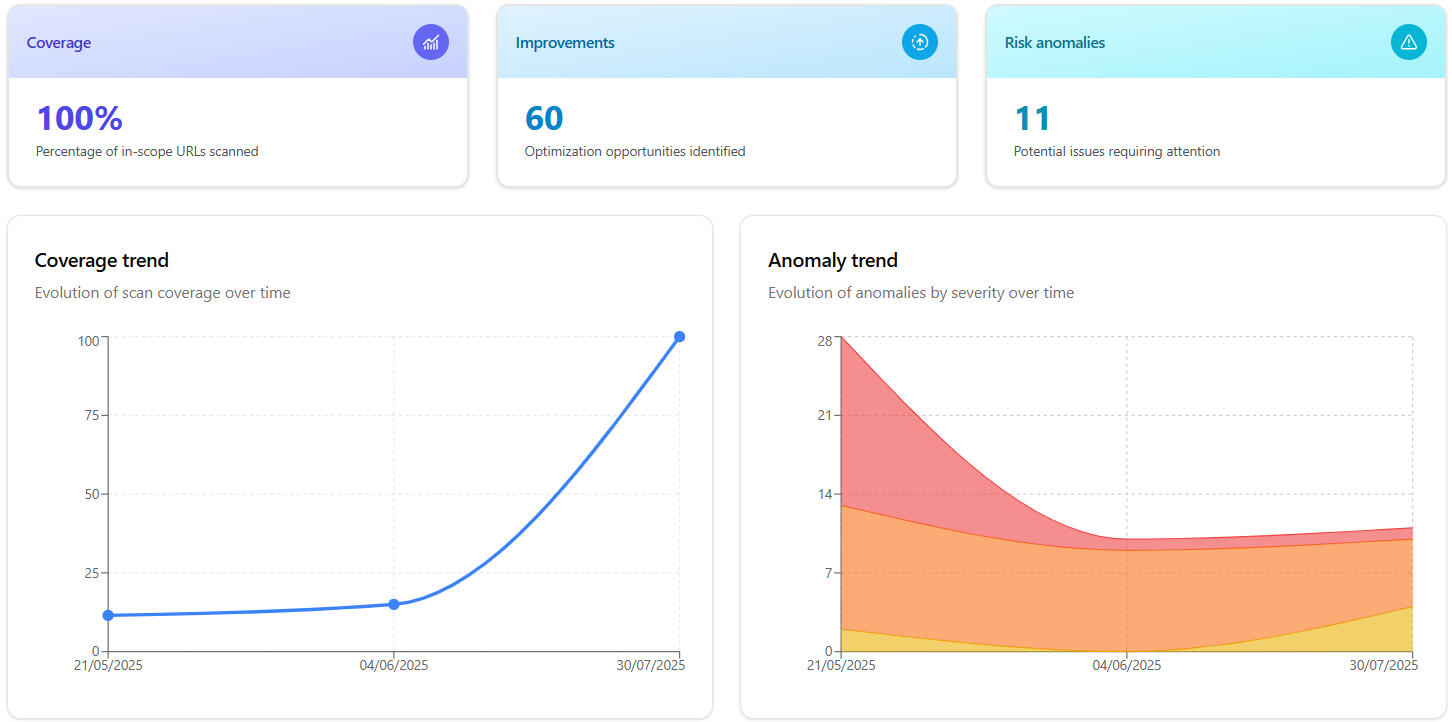
Coverage
No more blind spots. See what was scanned and what was missed.
All in-scope URLs and their status
Status changes between scans (e.g., a URL changes from Not Scanned to Scanned, or a new URL is added)
URLs that have been scanned but are out-of-scope
Improvements
Actionable suggestions to reduce noise, enhance scan quality and focus on valuable targets.
Redundant URLs
URLs returning only errors when scanned
Duplicate in-scope URLs
URLs hitting rate-limits
Anomalies
Detect and prioritize potential vulnerabilities with our smart scoring system.
Use the predefined anomalies or create your own
Customize the scoring to your needs
Focus on what's most important to you
Scale with confidence
Structure your assets using a flexible 3-level hierarchy.Manage users roles and access at any level.
1. Group
Example: Alphabet, Amazon
2. Organization
Example: Google, AWS
3. Project
Example: Youtube, S3
Metrics that matter
View analytics from the top (Group) down to a single Project
Monitor granular URL-level metrics for coverage, improvements, and anomalies
Track progress over time with historical evolution charts
Export results in JSON or HTML for easy sharing and reporting
Be among the first to try Scanlytics!
Sign up for updates and become an early adopter to get exclusive access and special discounts.
FAQs
Is Scanlytics a DAST tool?
No, Scanlytics is not a DAST tool. It’s the platform that helps you get the most out of your DAST scans:- DAST tools (ZAP, Burp Suite, Invicti...): perform dynamic security scans on websites or applications and report detected potential vulnerabilities. However, they don’t provide detailed information on how effective the scan actually was, which often leads users to trust the tool blindly - even though ensuring a high-quality scan is not as simple as it seems.- Scanlytics: a platform that analyzes the scan logs from your DAST tool to provide actionable insights on coverage, scan quality, and security anomalies - with customizable scoring and user-defined anomaly rules.Our mission is to give you all the information you need to understand exactly what happened during your DAST scan and to help you take the necessary steps to maximize its security value.
What information does Scanlytics analyze when processing the scan logs?
Logs vary in content and format depending on the tool, but they generally include details of all HTTP requests and responses made during the scan, such as URLs, parameters, headers, payloads, status codes, errors, and timing data.
How do Scanlytics anomalies differ from DAST vulnerabilities, and why is it unique?
The flexibility, ease of configuration, and speed of results.Suppose we want to set up a rule to detect if API tokens from an internal service called TRIX are exposed during a scan and report those findings with high severity. Imagine TRIX tokens follow the format trx_*:- DAST tools: Depending on the tool, custom rules may not be supported or may require advanced licenses. If supported, they must be configured via scripts in the tool’s supported language. Flexibility can be limited, and results are only available after the DAST scan completes (usually taking hours).- Scanlytics: Configuration is much easier and faster with a no-code approach. Flexibility is total: anything present in the scan logs can be reported as a finding with the severity you choose. Analyzing logs is much faster than running a full DAST scan, with results visible in minutes.
How does the anomaly scoring work?
Anomalies are detected based on suspicious patterns in HTTP requests and responses. Each anomaly type has a score, and higher scores indicate a higher probability of a vulnerability. You can customize these scores and/or define your own anomalies to focus on what matters most to you.
What tools are compatible with Scanlytics?
ZAP and Burp Suite, but we are prioritizing making Scanlytics compatible with other tools. If you have a specific tool in mind, please contact us at [email protected]
How can pentesters benefit from using Scanlytics?
Pentesters can benefit from Scanlytics by gaining detailed metrics on pentest coverage, helping them verify that all in-scope functionality has been tested. It also allows them to confirm that evaluated URLs are not only returning errors (which may indicate incorrect testing) and that rate limits aren't preventing full assessment of certain URLs. Additionally, Scanlytics helps cross-check discovered vulnerabilities with its own findings to complement and strengthen pentest reports.
Can I export the scan results?
Yes, export reports on coverage, improvements, and anomalies in JSON or HTML format.
How is the data structured?
Data is organized in a flexible hierarchy: Groups contain Organizations, which in turn contain Projects. This structure allows you to manage and scale your security projects efficiently.
Can multiple users access the same project with different roles?
Absolutely. Our granular permissions system allows you to define access precisely within Groups, Organizations, or individual Projects.
How does Scanlytics ensure the privacy of my data?
Your data privacy is our priority. We encrypt all data in transit (via TLS) and at rest using industry-standard AES-256 encryption.
Does Scanlytics share my data with third parties?
No. Your scan metrics are never shared with third parties. It is only accessible to users you explicitly authorize.
Is my scan data stored securely?
Yes. All scan metrics are stored in secure, access-controlled cloud environments compliant with SOC2 Type 2 and HIPAA.
Can I delete the scan metrics after using Scanlytics?
Yes, you can delete your metrics at any time. Once deleted, all metrics, and associated data are permanently removed from our systems.
Will my data be used for purposes beyond my scans?
No. We only use your scan data to generate the insights you request, never for other unrelated purposes.